Skip to content
uLearn
Toggle menu
  • Tutorials
  • About
  • Facebook
  • YouTube

Author: mchow

December 19, 2019May 9, 2026Photoshop

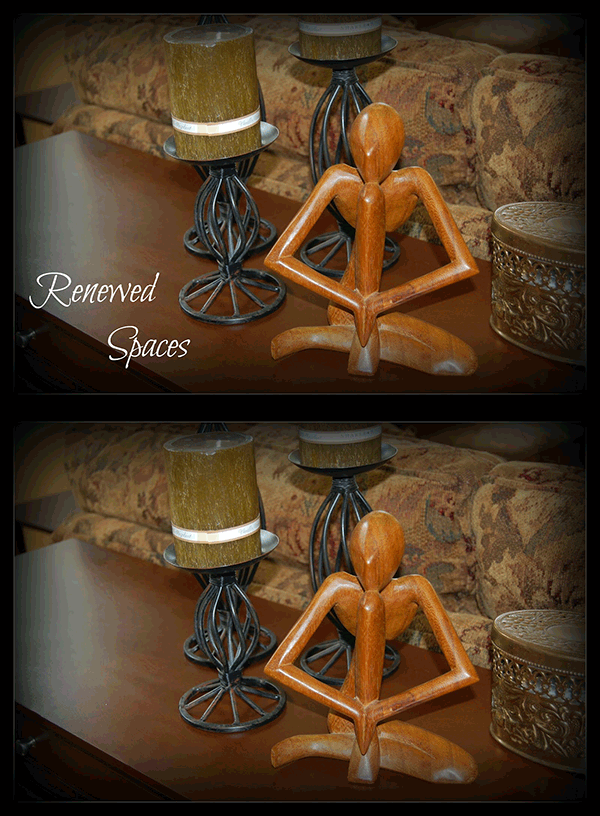
How to Remove Text from an Image in Photoshop

Before and After Removing the Text from an Image using the Content-Aware Fill function

Past clients have sometimes say this is the only image they have from the previous design team. Unfortunately, there are words on […]

December 18, 2019May 9, 2026Balsamiq, Wireframes

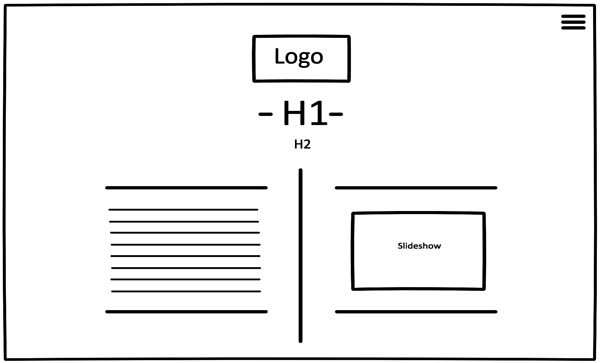
Wireframes – Using Balsamiq Wireframes

Balsamiq Wireframes example to a make believe website

One of the first wireframes that I had used to working with clients was Illustrator. It was okay, but it was a […]

December 12, 2019May 9, 2026Photoshop, Retouching

Learn to Use the Clone (Rubber) Stamp Tool in Photoshop

Clone (Rubber) Stamp Tool Before and After sample

The clone (rubber) stamp tool will allow you to copy parts of an image. Like the past few brushes, it involves the […]

December 11, 2019May 9, 2026Photoshop, Retouching

Learn How to Use the Red Eye Tool in Photoshop

Before and After Red Eye Tool Retouching

A camera flash, uh-oh!  A camera flash is fired directly into a person’s face, what is the end result? The light can […]

December 10, 2019May 9, 2026Photoshop, Retouching

Learn to Use the Content Aware Move Tool in Photoshop

Before and After Content-Aware Move Tool in Retouching Tools. First frame is the original image, second frame is the move mode, and the last frame is the extend mode (copy) Photographer: Zhengtao Tang (Unsplash)

Similar to the Patch Tool This tool works similarly to the Patch Tool in Destination mode, except it allows you to either […]

December 9, 2019May 9, 2026Photoshop, Retouching

Learn to Use the Patch Tool in Photoshop

Before and After Patch Tool Retouching

If you can master the Patch Tool, you will never look at the Cloning (Rubber Stamp) tool the same way. This tool […]

December 8, 2019May 9, 2026Photoshop, Retouching

Learn to Use the Healing Brush Tool in Photoshop

Before and After Healing Brush Tool for Retouching

To make your brush smaller use the keyboard shortcut  [ To make the brush larger, use the keyboard shortcut  ] Common Mistake […]

December 7, 2019May 9, 2026Photoshop, Retouching

Learn to Use the Spot Healing Brush Tool

Before and After Spot Healing Retouching

To make your brush smaller use the keyboard shortcut  [ To make the brush larger, use the keyboard shortcut  ] The spot […]

December 6, 2019May 9, 2026Photoshop, Retouching

Learn How to Retouch Your Images in Photoshop

Before and After Animation

Have you ever seen a fantastic photo but wonder how it was taken? A good photographer can accomplish this. And if not, […]

December 5, 2019May 9, 2026Illustrator

White Coloured Backgrounds in Logos vs Transparent Backgrounds

White Backgrounds Before and After as a Transparent Logo

Coloured Backgrounds vs Transparent Backgrounds Recently, I was reading up on my city’s sports teams’ websites for recent changes to the team. […]

Posts pagination

< 1 … 15 16 17 … 21 >

Categories

  • 30-Day Challenge (1)
  • Adobe (38)
  • AI (6)
  • Alternatives (12)
  • Balsamiq (1)
  • Call to Action (Web Marketing) (1)
  • Education (20)
    • Foundation (7)
  • eLearning (5)
  • Express (6)
  • Featured (9)
  • Figma (24)
  • Grids (2)
  • Hosting (1)
  • Illustrator (21)
  • InDesign (15)
  • InVision (2)
  • LinkedIn (11)
  • Logo (10)
  • Mockups (9)
  • Photoshop (42)
  • Prototypes (3)
  • Retouching (7)
  • Reviews (4)
  • Starting the Journey (11)
  • Typography (3)
  • Web (11)
  • Wireframes (8)
  • Workflow & Productivity (1)
  • XD (27)

Design Resources

uLearn.tech is your go-to hub for free design advice and resources. Join our creative community and up your design game. Design through education.

An Honour

ulearn.tech is located on the ancestral and unceded homelands of the hən̓q̓əmin̓əm̓ and Sḵwx̱wú7mesh speaking peoples. Being on this land is an honour for us.

Contact Info

Vancouver, BC, Canada
umediadesign@gmail.com
© 2026 ulearn.tech