
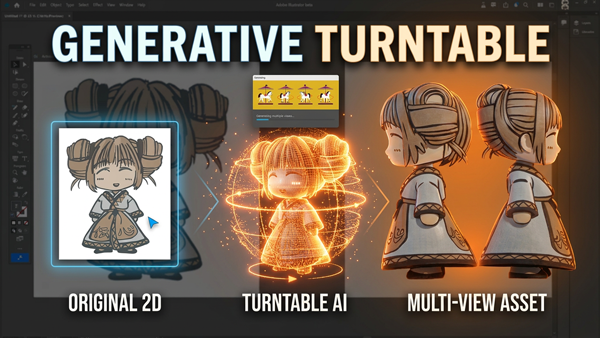
Adobe has been steadily weaving more AI‑powered tools into its creative ecosystem, and one of the most intriguing additions is a feature called Turntable. As of today, March 30th, it’s NOW tucked inside the standalone Adobe Illustrator, and while it’s still experimental, it already hints at a major shift in how vector artists might work in the near future.
If you’ve ever wished you could take a flat 2D illustration and quickly preview it from different angles — without redrawing anything — Turntable is Adobe’s first real attempt at making that possible.
Let’s walk through where to find it, how it works, and what you can expect when you try it on your own artwork.
Where to Find Illustrator Turntable
As of today, March 30th, Turntable is available in the standard Illustrator.
What Is the Turntable Feature?
Turntable is an AI‑driven generative tool that takes a 2D vector illustration and simulates it as if it were a 3D object. With a single click, Illustrator analyzes your artwork and generates a rotatable model that you can spin horizontally or tilt vertically.
This means you can instantly preview:
- Left and right side views
- Back views
- Quarter‑turn angles
- Slight perspective shifts
- Top‑down or upward‑looking angles
All without manually redrawing anything.
For character designers, product illustrators, and logo creators, this is a surprisingly powerful way to explore form and silhouette from multiple viewpoints.
How to Use Turntable in Illustrator
Because Turntable is still relatively new, you should expect some quirks:
- Certain angles may look distorted or stretched
- Complex shapes might produce unexpected geometry
- Fine details like hair strands, patterns, or accessories may shift
- Some rotations may feel more accurate than others
This is normal for early‑stage generative features. Adobe is clearly testing how far they can push AI‑assisted vector interpretation, and Turntable is one of the first public steps in that direction.
If something looks odd, don’t worry — that’s part of the feedback loop Adobe uses to refine these tools.
Should You Try It?
Absolutely. Even in its early form, Turntable is a fun and surprisingly powerful tool for:
- Character designers
- Logo creators
- UI/UX illustrators
- Anyone who wants quick multi‑angle references
If you’re already using Illustrator, the Beta version installs alongside your main app — so there’s no risk in giving it a spin.
I do think Turntable is one of those features that feels like a glimpse into the future of vector design. It’s not perfect yet, but it’s already useful, and it’s only going to get better as Adobe refines it.
Give it a try in Illustrator, experiment with your own artwork, and see what kinds of angles and perspectives you can generate.
Thanks for reading — and if you want more tutorials like this, check out the rest of the content on ulearn.tech.
2 thoughts on “How to Use Illustrator’s Turntable”
Comments are closed.